Reports Modes
Reports operates in two modes:
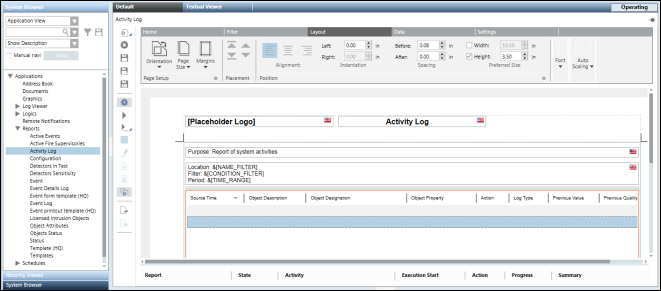
When you create a new Report Definition, it opens in Edit mode (default mode).
Edit mode allows you to design the layout of a report, delete a report, and so on. You can also display/hide the Reports ribbon using the Properties icon  .
.

NOTE:
You can switch to Run mode by clicking the Run icon  or Run As icon
  in the Reports toolbar.
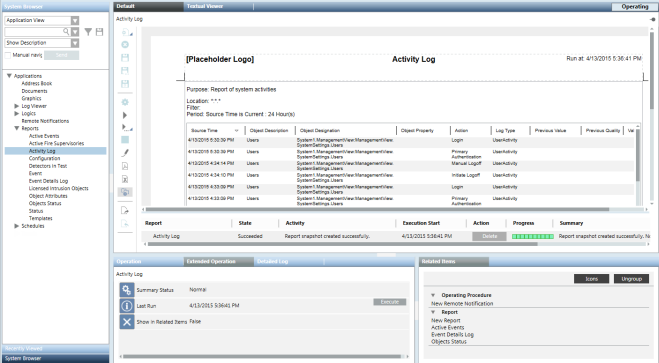
The Run mode executes a Report Definition and displays the data retrieved from Reports and other services. Following are the characteristics of the Run mode:
- The ribbon disappears.
- Keywords are replaced by actual data.
- No element can be added or deleted in this mode.
- The layout elements are populated with data.
- You can perform the following activities:
- Sorting (ascending or descending) or changing column width.
- Selecting rows in tables.
- Entering text in the Editable Field control.
- Selecting text entries from the Custom Text Selection control or values of a text group from the Text Group Selection control.
- Adding, modifying, and deleting comments from the Comments table.
- The Stop icon
 or the Stop button
  in the Report Management section stops the execution of a Report Definition.
 - In Run mode, when you move the cursor over a table/plot, a tooltip displays the applicable filter and the number of records (only for tables).
The number of records tooltip is helpful in deciding the destination type, for example, Printer. - You can toggle to Edit mode by clicking Edit
 on the Reports toolbar.
If you perform sorting in Run mode and then switch to Edit mode, the Select Edit Option dialog box displays asking whether you want to save or discard the changes
you made in the Run mode, or to create a new Report Definition based on the changes.
NOTE:
When you select Control Panel > Region and Language > Additional Settings, you can configure local settings for the following fields:
- numeric (including decimal symbol, no. of digits after decimal)
- short date
- short time
The report workspace specifications, such as page size/margin or table width/height, also change according to the local settings.
