Scheduling
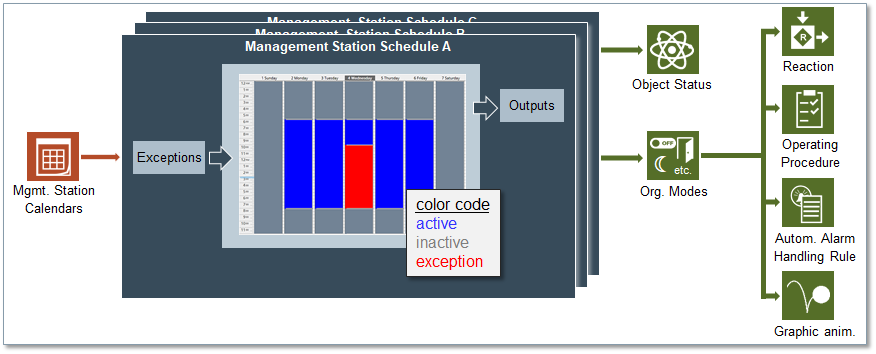
The Schedules component of the management platform enables you to:
- Set up schedules to automate the operation of the building control site: Schedules are defined on a weekly and daily basis. You can specify a different hourly timetable for each day of the week.
For example, you could schedule a heating system to work from 9 a.m. to 6 p.m. on Mondays and Fridays and from 8 a.m. to 8 p.m. on Tuesdays, Wednesdays, and Thursdays. - Set up exception calendars, which can be associated to schedules: Calendars define dates (or date ranges) during which a schedule does not apply.
For example, you could create a holiday calendar that overrides the regular heating schedule to reduce energy costs.
When you create a calendar, you can choose specific dates (January 15), a date range (August 1 – 31), or a week and a day you want the exception to run (third week of the month, on Wednesday).
Then you can associate one or more schedules with the calendar.
You can configure schedules and calendars to execute centrally, on the management platform as well as locally, directly on the BACnet field panel.
You can set up multiple schedules and exception calendars to run at the same time.
This section provides background information on Schedules of Desigo CC. For related procedures, see the step-by-step section.
