Display Security Key Set
Where You Can Find the Dialog Box
From the system tree, expand your BACnet device. From the Network Security Objects folder, select an object. In the Property Name column, double-click key-sets.
What You Can Do with the Dialog Box
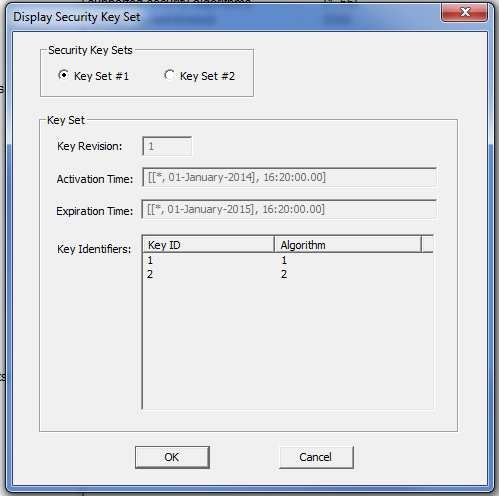
The Display Security Key Set dialog box allows you to view the contents of the devices 2 key sets. The dialog box displays read-only properties of the key sets.
If a key set has not been provided, the Key Revision field is set to “0”, the Key Identifiers are blank, and the Activation Time and Expiration Time fields display wildcard values.
|
Field/Button |
Description |
|
Security Key Sets |
Check one of these buttons to view details of the key set. |
|
Key Revision |
Displays the number of the security key set selected. |
|
Activation Time |
Displays the UTC time the key set is valid. |
|
Expiration Time |
Displays the UTC time the key set is no longer valid. |
|
Key Identifiers |
Displays the key to be used and the signature and encryption algorithm the key is used with. |
|
OK |
Saves the information and exits the dialog box. |
|
Cancel |
Cancels the function and exits the dialog box. |
