Edit Character String List
Where You Can Find the Dialog Box
From the system tree, expand your BACnet device. From the Charstring Values folder, select an object. In the Property Name column, right-click on alarm-values, and select Write Property.
What you can do with the Dialog Box
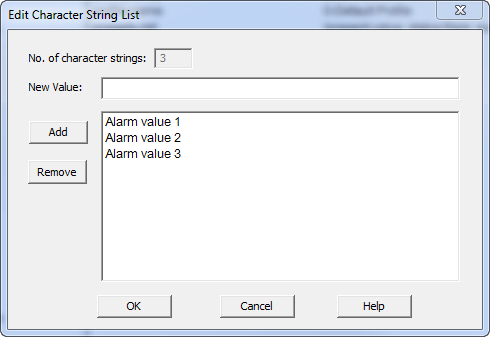
The Edit Character String List dialog box allows you to edit the Character String list.
|
Field/Button |
Description |
|
No. of character strings |
Non editable. Displays the number of associated character strings. |
|
New Value |
Enter a new character string value. |
|
Add |
Allows you to add the character string entered in the New Value field. |
|
Remove |
Allows you to remove a selected character string. |
|
OK |
Saves the information and exits the dialog box. |
|
Cancel |
Cancels the function and exits the dialog box. |
