Edit Process ID Filter
Where You Can Find the Dialog Box
From the system tree, expand your BACnet device. From the Notification Forwarders folder, select an object. In the Property Name column, double-click process-identifier-filter.
What you can do with the Dialog Box
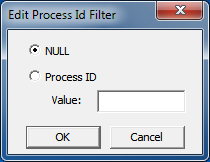
The Edit Process ID Filter dialog box allows you to apply a value for the process ID or mark it as null.
|
Field/Button |
Description |
|
NULL |
Select this button for no Process ID. It means the Process ID is registered as “nothing.” |
|
Process ID |
Select this button to enter a Process ID in the Value field. |
|
Value |
Enter any 32-bit number to serve as the Process ID. |
|
OK |
Confirms your modifications and exits the dialog box. |
|
Cancel |
Cancels the function and exits the dialog box. |
