Device Communication Control
Where You Can Find the Dialog Box
From the system tree, select your BACnet device, and then from the Services menu, select Device Communication Control.
What you can do with the Dialog Box
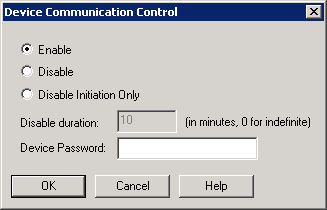
The Device Communication Control dialog box allows you to send a Device Communication Control command to the selected device.
|
Field/Button |
Description |
|
Enable |
Check this button to enable communication for the selected device. |
|
Disable |
Check this button to disable communication for the selected device. |
|
Disable Initiation Only |
Check this button to disable the selected device’s ability to initiate communication. |
|
Disable Duration |
Enter the times in minutes that you want the selected device to be disabled. Enter 0 for an indefinite amount of time. |
|
Device Password |
Enter the device password here. |
|
OK |
Saves the information and exits the dialog box. |
|
Cancel |
Cancels the function and exits the dialog box. |
