Who-Is
Where You Can Find the Dialog Box
From the system tree, select the top-level node, BACnet Networks, and then from the Services menu, select Send Who-Is.
What You Can Do with the Dialog Box
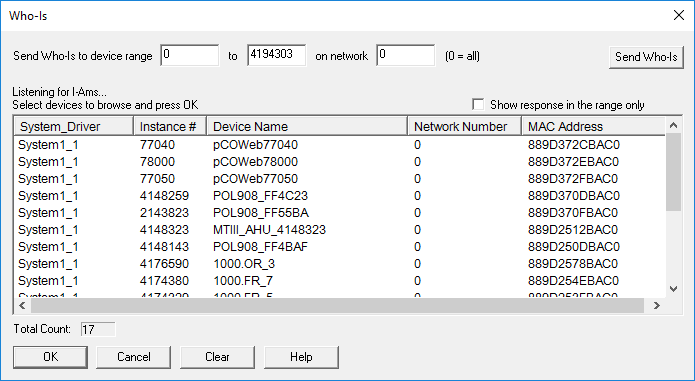
The Who-Is dialog box allows you to send a Who-Is request to devices on the BACnet network. Devices connected to the network within the specified device range display in the list.
|
Field/Button |
Description |
|
Send Who-Is To Device Range |
Enter a range of numbers on a network to find a device. |
|
Send Who-Is |
Click this button once you have entered a device range. |
|
Listening for I-Ams |
Lists the System Driver, Instance Number, Device Name, Network Number, and MAC Address. |
|
Show response in the range only |
Lists devices that are defined in the range. |
|
Total Count |
Indicates the total number of devices found. |
|
OK |
Once you select a device or devices from the Listening for I-Ams list, click OK to browse the device. |
|
Cancel |
Cancels the function and exits the dialog box. |
|
Clear |
Clears the device from the Listening for I-Ams device list. |
