Who-Has
Where You Can Find the Dialog Box
From the Services menu, select Send Who-Has.
What You Can Do with the Dialog Box
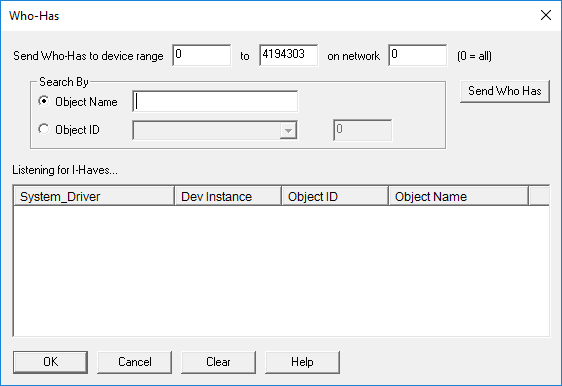
The Who-Has dialog box allows you to broadcast a Who-Has to find the device with the object you are looking for.
|
Field/Button |
Description |
|
Send Who-Has to Device Range |
Enter a range of numbers on a network to find the device that has the object you are looking for. |
|
Object Name |
Select this button and enter an object name you want to search for on the network. The object can contain wildcards such as AI*, *A*, or *A. |
|
Object ID |
Select this button and enter an Object ID and an Instance Number for the object you want to search for on the network. |
|
Send Who Has |
Select this button once you have entered either the Object Name or the Object ID and Instance Number. |
|
Listening for I-Haves |
Lists the System Driver, Device Instance, Object ID, and Object Name. |
|
OK |
Saves the information and exits the dialog box. |
|
Cancel |
Cancels the function and exits the dialog box. |
|
Clear |
Clears the devices from the Listening for I-Haves device list. |
