Re-Initialize Device
Where You Can Find the Dialog Box
From the system tree, select your BACnet device. From the Services menu, select Re-Initialize Device.
What You Can Do with the Dialog Box
The Re-Initialize dialog box allows you to send a warmstart or coldstart command to re-initialize the selected device.
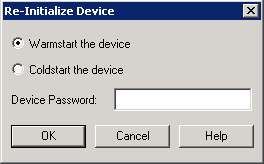
|
Field/Button |
Description |
|
Warmstart the Device |
Warmstarts the selected device. |
|
Coldstart the Device |
Coldstarts the selected device. |
|
Device Password |
Enter a device password if the device was configured to require a password for the Re-initialize device service. |
|
OK |
Saves the information and exits the dialog box. |
|
Cancel |
Cancels the function and exits the dialog box. |
