Life Safety Service
Where You Can Find the Dialog Box
From the system tree, expand your BACnet device. From one of the Life Safety folders, select an object. From the Services menu, select LifeSafety Operation.
What You Can Do with the Dialog Box
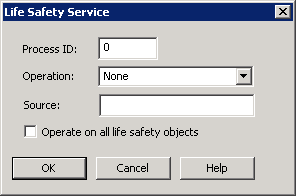
The Life Safety Service dialog box allows you to perform the life safety operation when you have a Life Safety Point or Zone selected.
|
Field/Button |
Description |
|
Process ID |
Enter the Process ID of the application in the device you are performing the life safety operation on. |
|
Operation |
Click the drop-down arrow to select from one of the following: None, Silence, Silence Audible, Silence Visual, Reset, Reset Alarm, and Reset Fault. |
|
Source |
Enter an optional text message here. |
|
Operation on All Life Safety Objects |
Check this check box to perform the life safety operation on all life safety objects in the device. If the life safety operation is not the expected operation for a given object, the object will be skipped. |
|
OK |
Saves the information and exits the dialog box. |
|
Cancel |
Cancels the function and exits the dialog box. |
