Create Object
Where You Can Find the Dialog Box
From the system tree, select your BACnet device, and then from the Services menu, select Create Object.
What you can do with the Dialog Box
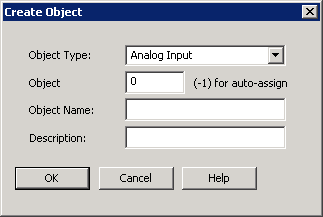
The Create Object dialog box allows you to create a new object in a device.
|
Field/Button |
Description |
|
Object Type |
Click the drop-down arrow to select the new object type you want to create. |
|
Object |
Enter the Object Instance number you want to assign to this object. Entering -1 activates the auto-assign function. |
|
Object Name |
Enter the name you want to assign to this object. |
|
Description |
Enter a text description of the object you are creating. |
|
OK |
Saves the information and exits the dialog box. |
|
Cancel |
Cancels the function and exits the dialog box. |
