Send Text Message
Where You Can Find the Dialog Box
From the system tree, select your BACnet device. From the Services menu, select Send Text Message.
What You Can Do with the Dialog Box
The Send Text Message dialog box allows you to send a text message to a device or broadcast a text message to multiple devices.
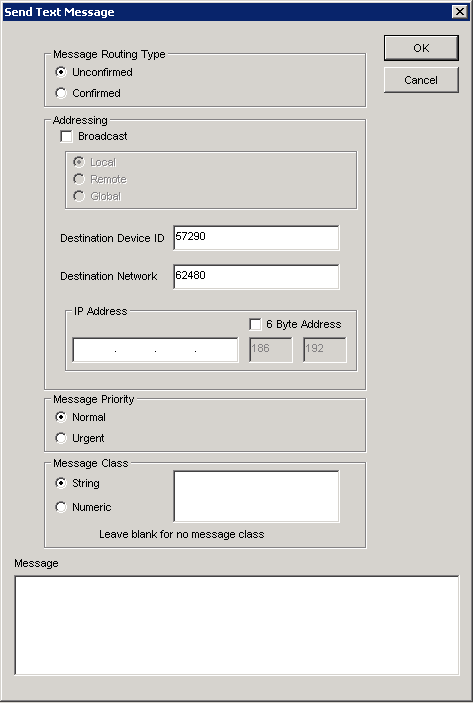
|
Field/Button |
Description |
|
Unconfirmed |
Click this button to send an unconfirmed text message to a device or devices. Unconfirmed messages can also be broadcast to the local subnet, a remote subnet, or globally. |
|
Confirmed |
Click this button to send a message with a confirmation that it has been received by the device or devices it was intended for. |
|
Broadcast |
Click this check box to broadcast the text message to the local subnet, a remote subnet, or globally. |
|
Destination Device ID |
Leave the default ID. |
|
Destination Network |
Leave the default network. |
|
IP Address |
Leave this field blank. |
|
6 Byte Address |
Leave this check box unchecked. |
|
Normal |
Click this button for messages that are not urgent. |
|
Urgent |
Click this button for urgent messages. |
|
String |
Click this button to send a string message. |
|
Numeric |
Click this button to send a numeric message. |
|
Message |
Enter the message you want to send to the device. |
|
OK |
Saves the information and exits the dialog box. |
|
Cancel |
Cancels the function and exits the dialog box. |
