Enter Date/Time
Where You Can Find the Dialog Box
From the system tree, expand your BACnet device. Expand the folder of the object you want to modify, and then select the object. Then, double-click the property name you want to modify.
|
Object Type |
Property Name |
|
Accumulator |
value-change-time |
|
Averaging Objects |
maximum-value-timestamp |
|
Binary Inputs |
change-of-state-time |
|
Binary Outputs |
change-of-state-time |
|
Binary Values |
change-of-state-time |
|
Pulse Converter |
update-time |
What You Can Do with the Dialog Box
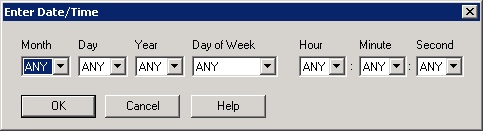
The Enter Date/Time dialog box allows you to edit dates and times for start-time and stop-time properties in a trend log object.
The default setting, ANY, is a wildcard that the device interprets to mean match any available data.
|
Field/Button |
Description |
|
Month |
Accept the default setting of ANY, or click the drop-down arrow to select the month. The numbers 1 through 12 represent the number of months in a year, with 1 representing January. |
|
Day |
Accept the default setting of ANY, or click the drop-down arrow to select day of the month. The numbers 1 through 31 represent the number of days in a month. |
|
Year |
Accept the default setting of ANY, or click the drop-down arrow to select a year, 1990 through 2036. |
|
Day of Week |
Accept the default setting of ANY, or click the drop-down arrow to select a day of the week. |
|
Hour |
Accept the default setting of ANY, or click the drop-down arrow to select an hour of the day. The numbers 0 through 23 represent the number of hours in a day. |
|
Minute |
Accept the default setting of ANY, or click the drop-down arrow to select the minute. The numbers 0 through 59 represent the number of minutes in an hour. |
|
Second |
Accept the default setting of ANY, or click the drop-down arrow to select the second. The numbers 0 through 59 represent the number of seconds in a minute. |
|
OK |
Confirms your modifications and exits the dialog box. |
|
Cancel |
Cancels the function and exits the dialog box. |
