Edit Special Event
Where You Can Find the Dialog Box
From the system tree, expand your BACnet device. From the Schedule folder, select an object. In the Property Name column, double-click exception-schedule. Then, double-click one of the calendar references. Then, double-click the time entry you want to edit. In the Edit Exception Schedule dialog box, select the calendar reference you want to edit, and then click the Edit button.
What You Can Do with the Dialog Box
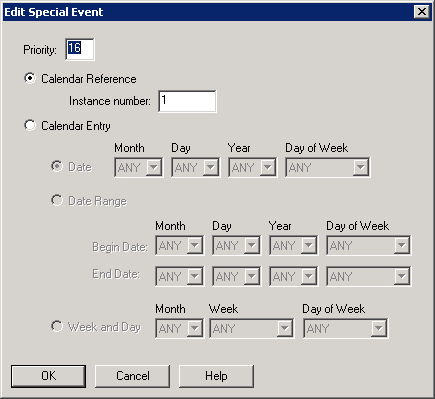
The Edit Special Event dialog box allows you to set a priority for a special event, select a date or period for a special event, and display the instance number of a calendar reference.
|
Field/Button |
Description |
|
Priority |
Allows you to enter the priority level of the special event. |
|
Calendar Reference & Instance Number |
Displays the instance number of the calendar reference. |
|
Calendar Entry |
Allows you to select a date, date range, or weekly and day period for a particular special event. |
|
OK |
Confirms your modifications and exits the dialog box. |
