Edit Object Property Reference
Where You Can Find the Dialog Box
From the system tree, expand your BACnet device. Expand the folder of the object you want to modify, and then select the object. Then, double-click the property name you want to modify.
Object Type | Property Name |
Accumulator | event-algorithm-inhibit-ref |
Alert Enrollments | event-algorithm-inhibit-ref |
Analog Inputs | event-algorithm-inhibit-ref |
Analog Outputs | event-algorithm-inhibit-ref |
Analog Values | event-algorithm-inhibit-ref |
Averaging Values | object-property-reference |
Binary Inputs | event-algorithm-inhibit-ref |
Binary Outputs | event-algorithm-inhibit-ref |
Binary Values | event-algorithm-inhibit-ref |
Bitstring Values | event-algorithm-inhibit-ref |
Charstring Values | event-algorithm-inhibit-ref |
Escalators | Event-algorithm-inhibit-ref |
Event Enrollments | event-algorithm-inhibit-ref |
Event Logs | event-algorithm-inhibit-ref |
Global Groups | event-algorithm-inhibit-ref |
Integer Values | event-algorithm-inhibit-ref |
Large Analog Values | event-algorithm-inhibit-ref |
Life Safety Points | event-algorithm-inhibit-ref |
Life Safety Zones | event-algorithm-inhibit-ref |
Load Controls | event-algorithm-inhibit-ref |
Loops | controlled-variable-reference |
Multistate Inputs | event-algorithm-inhibit-ref |
Multistate Outputs | event-algorithm-inhibit-ref |
Multistate Values | event-algorithm-inhibit-ref |
Positive Integer Values | event-algorithm-inhibit-ref |
Pulse Converter | event-algorithm-inhibit-ref |
Trend Log Multiples | event-algorithm-inhibit-ref |
Trend Logs | event-algorithm-inhibit-ref |
What you can do with the Dialog Box
The Edit Object Property Reference dialog box allows you to modify the object-property-reference property.
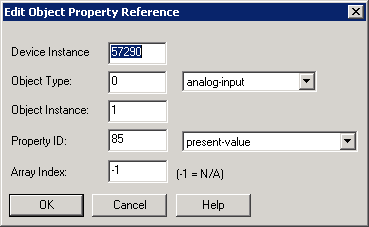
Field/Button | Description |
Device Instance | Allows you to enter the Device Instance number. |
Object Type | Allows you to select an object type by clicking the drop-down arrow. |
Object Instance | Allows you to enter the Object Instance number. |
Property ID | Allows you to enter a property ID number by clicking the drop-down arrow. |
Array Index | Allows you to enter an array index number. The default is -1, which means not applicable. |
OK | Saves the information and exits the dialog box. |
Cancel | Cancels the function and exits the dialog box. |
