Edit Recipient List
Where You Can Find the Dialog Box
From the system tree, expand your BACnet device. From the Notification Classes folder, select an object. In the Property Name column, double-click recipient-list, and then double-click a device in the Recipient column.
What you can do with the Dialog Box
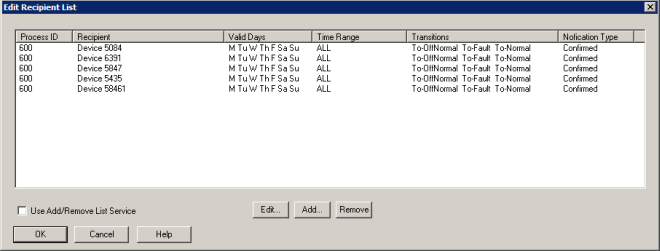
The Edit Recipient List dialog box displays a Process ID, Recipient, Valid Days, Time Range, Transitions, and Notification Type for each BACnet destination in the recipient list and allows you to add, edit, or remove recipient destination information.
|
Field/Button |
Description |
|
Edit |
Allows you to edit the recipient device destination information. |
|
Add |
Allows you to add recipient device destination information to the list. |
|
Remove |
Allows you to delete recipient device destinations from the list. |
|
Use Add/Remove List Service |
|
|
OK |
Confirms your modifications and exits the dialog box. |
