Edit Destination
Where You Can Find the Dialog Box
From the system tree, expand your BACnet device. From the Notification Classes folder, select an object. In the Property Name column, right-click recipient-list and select Write Property. From the Edit Recipient List dialog box, click Add.
What you can do with the Dialog Box
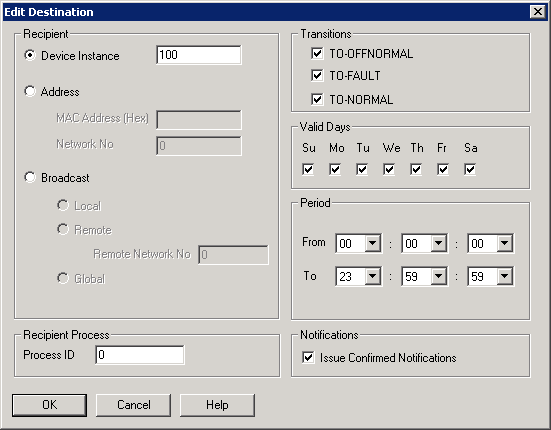
The Edit Destination dialog box allows you to edit an existing BACnet destination or add a new BACnet destination in the Recipient_List property of a Notification Class object.
|
Field/Button |
Description |
|
Recipient |
|
|
Recipient Process |
|
|
Transitions |
|
|
Valid Days |
Allows you to check one or more days of the week on which events are sent to a recipient, as desired. |
|
Period |
Allows you to specify the times on each day when events are to be sent to a recipient in the From and To fields by clicking the drop-down arrows, if desired. These time fields are in a 24-hour or military time format, for example, seven o'clock in the evening is represented as 19:00.
|
|
Notifications |
Allows you to specify whether to send confirmed event notifications to this recipient. If unchecked, unconfirmed event notifications are sent. |
