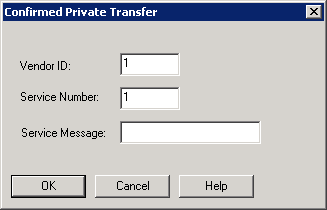
Confirmed Private Transfer
Where You Can Find the Dialog Box
From the system tree, select your BACnet device, and then from the Services menu, select Private Transfer.
What you can do with the Dialog Box
The Confirmed Private Transfer dialog box provides a way to send messages from one BACnet device to another.
|
Field/Button |
Description |
|
Vendor ID |
Allows you to enter the Vendor ID belonging to this device. |
|
Service Number |
Allows you to enter the Service Number of this request. |
|
Service Message |
Allows you to enter a message to send to another BACnet device. |
|
OK |
Saves the information and exits the dialog box. |
|
Cancel |
Cancels the function and exits the dialog box. |
