|
Field/Button |
Description |
|
Change of Bit String |
- Time Delay. Allows you to enter a value for the time delay.
- Bitstring Values. Allows you to select a bitstring value such as normal, fault, or offormal.
|
|
Change of State |
- Time Delay. Allows you to enter a value for the time delay.
- Property State Type. Allows you to enter a state type—such as binary, Boolean, etc.—from a drop-down list.
- Value. Allows you to select a value for the state type.
|
|
Change of Value |
- Time Delay. Allows you to enter a value for the time delay.
- Property Increment. Allows you to enter a value for the property increment.
|
|
Command Failure |
- Time Delay. Allows you to enter a value for the time delay.
- Setpoint Reference. Allows you to enter the Device Instance number, the Object Type, the Object Instance number, the Property name, and the Array Index number, where -1 represents not applicable.
|
|
Floating Limit |
- Time Delay. Allows you to enter a value for the time delay.
- Low Diff Limit. Allows you to enter a value for a low difference limit.
- High Diff Limit. Allows you to enter a value for a high difference limit.
- Deadband. Allows you to enter a value for the deadband.
- Setpoint Reference. Allows you to enter the Device Instance number, the Object Type, the Object Instance number, the Property name, and the Array Index number, where -1 represents not applicable.
|
|
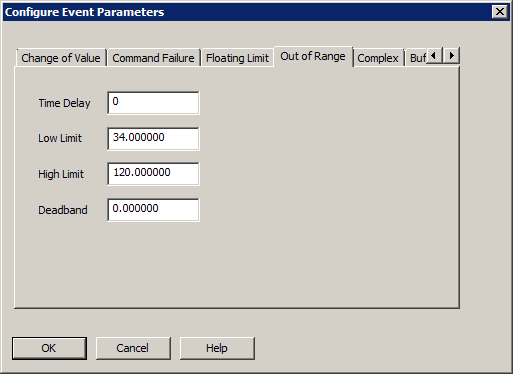
Out of Range |
- Time Delay. Allows you to enter a value for the time delay.
- Low Limit. Allows you to enter a value for the out-of-range low limit.
- High Limit. Allows you to enter a value for the out-of-range high limit.
- Deadband. Allows you to enter a value for the deadband.
|
|
Change of Life Safety |
- Time Delay. Allows you to enter a value for the time delay.
- Mode Property Reference. Allows you to enter the Device Instance number, the Object Type, the Object Instance number, the Property name, and the Array Index number, where -1 represents not applicable.
- Life Safety Alarm Values/Alarm Values. Allows you to select alarm values for life safety and non-life safety applications.
|
|
Buffer Ready2 |
- Notification Threshold. Allows you to enter a value for the notification threshold.
- Previous Notify Count. Allows you to enter a value for the previous notify count.
|
|
Unsigned Range |
- Time Delay. Allows you to enter a value for the time delay.
- Low Limit. Allows you to enter a value for the unsigned low limit.
- High Limit. Allows you to enter a value for the unsigned high limit.
|
|
OK |
Confirms the modifications and exits the dialog box. |
|
Cancel |
Cancels the function and exits the dialog box. |