OPC UA COM Interoperability Components
OPC UA Setup
Administrator rights are needed to install the OPC UA setup (OPC UA Wrapper Setup.exe).
The software is installed in the following folders:
C:\Program Files(x86)\Common Files\OPC Foundation\UA\...
C:\Program Files(x86)\OPC Foundation\UA\...
C:\Program Files(x86)\[company name]\ OPCUAWrapper
C:\ProgramData\OPC Foundation\Config
The installation destination folder may cause problems when multiple vendors provide the UA COM Interoperability Components. As result, different vendors may provide different versions and different configuration settings and the component may not work properly.
It is necessary to install the setup on the Desigo CC server computer.
OPC UA Deployment
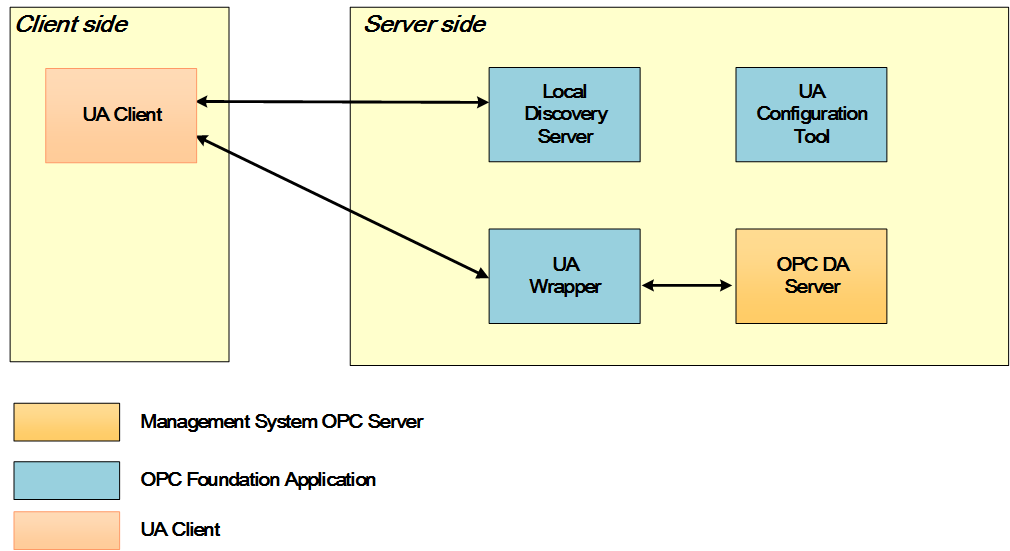
- The Local Discovery Server, required to expose the available Desigo CC OPC UA server to the third-party OPC UA clients.
- The UA wrapper for OPC COM server, consisting of an executable, a UA server that uses COM to communicate with the OPC COM servers (wrapper).
- The UA Configuration Tool, which allows administrators to configure the wrapper and manage the UA Application certificates. The executable Opc.Ua.ConfigurationTool.exe is available in:
C:\Program Files(x86)\[company name]\OPCUAWrapper.
The following figure shows the deployment of the OPC UA components.
UA Wrapper
The UA wrapper can be used on existing OPC COM servers to allow the server to supply its information to a UA client. The UA wrapper emulates a UA server, obtaining all the information needed from the underlying (wrapped) OPC COM server.
The following figure shows the UA wrapper architecture:
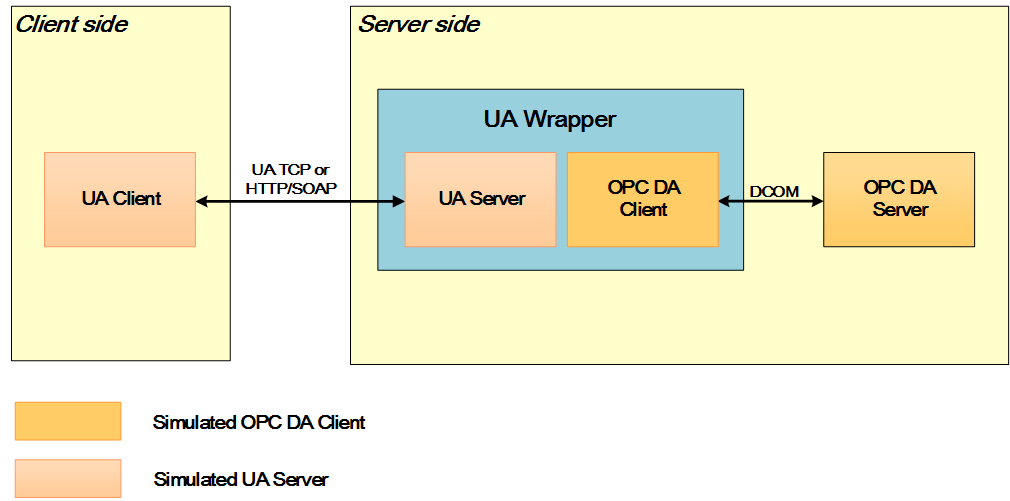
- The UA wrapper communicates with the OPC COM server to provide data to the UA clients.
- The UA wrapper uses DCOM as local protocol and HTTP/S or OPC.TCP as network protocol.
- The OPC COM server and the UA wrapper must run on the same machine, as the UA client is usually located on a different machine.
- The UA wrapper is configured as a service that is always active.
Local Discovery Server
The Local Discovery Server (LDS) allows UA servers to be discovered at a well-known location by the clients connecting remotely.
The UA wrapper setup configures the LDS to run as a service. This service is expected to be installed on each computer that is running a UA server.
If a client wants to connect to a UA server, it must discover a URL for that server endpoint. Each UA server exposes one or more endpoints which the clients can use to connect. UA servers register all their endpoints with the LDS.
The LDS is a specialized server, which runs on a well-known port. UA clients can connect to the LDS and get a list of UA servers and their endpoints running on a computer. The LDS is similar to the OPCEnum module in Classic OPC.
In order to browse for a generic UA server (on a remote/local machine), the LDS must run on the machine.
Technically, the LDS is just a specialized UA server developed by the OPC Foundation and – like any other UA server – the LDS requires a certificate to run.
A UA server can have multiple server endpoint definitions. It is possible to define multiple endpoints to permit certain clients to connect to certain ports. All endpoints within a particular server share the same instance certificate. This means that the user validation is done on per server instance basis, not per endpoint. Therefore, a client that has the server instance certificate will be able to connect to any endpoint configured in the server, provided that the client supports the type of encryption that the endpoint uses.
