OPC Unified Architecture
OPC Unified Architecture (OPC UA) is the new standard for data communication in process automation provided by the OPC Foundation.
It is expected that OPC UA will replace the DCOM-based specifications of the OPC Foundation (DA, HDA, and A&E) over the next years as OPC UA unifies all the functions provided by those specifications.
Basically, today most systems are built to use the OPC COM specifications. For this reason, the OPC Foundation is making the OPC UA COM Interoperability Components available to OPC members with existing COM-based products. These components allow vendors to add UA support to their products without any programming.
The COM Interoperability components consist of two executables:
- An OPC COM server which uses UA to communicate with UA servers (the proxy)
- A UA server which uses COM to communicate with OPC COM servers (the wrapper).
A security model is an architecture that allows developers, administrators, and end-users to use applications in a distributed environment while ensuring that those applications, the computers they run on, and the information exchanged are not compromised.
To meet different security and administrative requirements, the OPC UA security model offers four tiers for application authentication and two tiers for certificate management. It is up to administrators to decide which tiers best match their needs.
The main actors of the UA security model are detailed below.
Application Instance
An OPC UA application installed on one machine is called an application instance. Each instance must have its own certificate which it uses to identify itself when connecting to other applications. Each application instance has a globally unique URI which identifies it.
Administrator
An application instance must have an administrator to manage the application security settings.
Operator
An operator is a person who uses the application instance. More than one operator may exist for any given application. An operator may have user credentials which are used to determine access rights and to track activities.
Certificate Authority (CA)
A Certificate Authority (CA) is an administrator or organization that is responsible for creating certificates. The Certificate Authority must verify that the information in the certificate is correct and add a digital signature to the certificate that is used to verify that the information is unchanged. Each CA must have its own certificate which is used to create the digital signatures.
Certificate
A certificate is an electronic ID that can be held by an application. The ID includes information that identifies the holder, the issuer, and a unique key that is used to create and verify digital signatures. The syntax of these certificates conforms to the X.509 specification, and these certificates are also known as X.509 Certificates. The certificates also have an associated private key.
User Credentials
User credentials is a generic term for an electronic ID which identifies an operator. It may be passed to a server once the application certificate is used to create a secure channel. It is used to determine access rights and track activities.
Private Key
A private key is a secret number known only to the holder of a certificate. This number allows the holder to create digital signatures and decrypt data. If the secret number is revealed to unauthorized parties, the associated certificate can no longer be trusted or used.
Certificate Store
A certificate store is a place where certificates and private keys can be stored on the file system. All Windows systems provide a registry-based store called Windows Certificate Store. All the systems support a directory containing the certificates stored in a file which is also called an OpenSSL Certificate Store.
Self-signed Certificate
A self-signed certificate is a certificate with no certificate authority. These certificates can be created by anyone and can be used when the administrators of UA applications can check the owner of the certificate by reviewing the content of the certificate. In this case, the security is addressed in another manner.
Trust List
A trust list is a list of certificates which are trusted by an application instance. When security is enabled, UA applications must reject connections from peers if they do not have a certificate that is trusted or issued by a CA that is in the trust list.
Revocation List
A revocation list is a list of certificates revoked by a CA that must not be accepted by an application instance.
Security Term and Interactions
The relationship between the actors described above is illustrated in the following diagram.
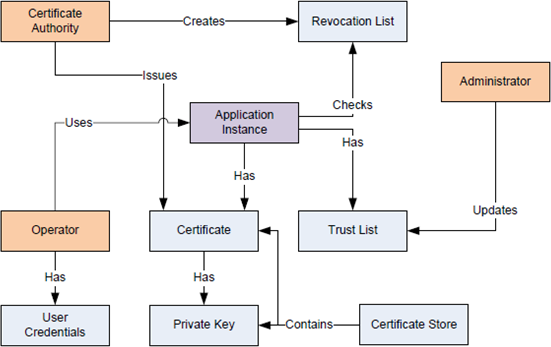
In OPC UA, each installation of an application must have an application instance certificate that uniquely identifies the application and the machine where it is running. These certificates come with private keys that allow applications to create secure communication channels that cannot be viewed by third parties or modified while in transit. These certificates also allow OPC UA applications to be identified by peers and to block the communication from a peer if it is not authorized.
Tier 1 - No Authentication
Tier 1 implies that the client and server allow any peer to communicate; all valid certificates are trusted. The application certificates are used only to provide unverifiable information about the peer. The receiver has no way to determine if the sender is the legitimate holder of the certificate.
In this mode, the client and server automatically accept valid certificates even if they have not been explicitly added to the trust lists managed by the client and server applications. This mode requires no configuration at server or client level.
Tier 1 cannot ensure the privacy of any information transmitted, including user credentials. Consequently, it would only be appropriate in a system that has guaranteed security in some other way, such as a physically secured and isolated system or where communication is secured via VPN or other transport layer security. It would also be appropriate when information is public and access to it is open.
Tier 2 - Server Authentication
Tier 2 implies that the server allows any client to connect, and if user authentication is required, this operation is performed by sending user credentials (such as, a username/password) after the secure channel is established. Clients, on the other hand, must be configured by the administrator to trust the server.
Clients will trust a server if an administrator has explicitly placed the server certificate in its trust list, or if the server certificate was issued by a certificate authority (CA) that is in its trust list.
If the server certificate was not explicitly in the trust list (for example, the certificate was issued by a CA in the trust list) the client must compare the DNS name in the server certificate to the DNS name it used to connect to the server. If they match, the client knows it is connecting to the machine it thinks it is connecting to. This does not guarantee that the client is connected to the intended server; it only means that the machine is the one that corresponds to that DNS name.
This tier provides adequate security, but the server cannot restrict the client applications.
Tier 3 - Client Authentication
Tier 3 implies that the client connects to any server but the server only allows trusted clients to connect. A client never provides sensitive information since it does not know if the server is legitimate.
In this tier, clients need no pre-configuration other than the server URL. However, a server will only trust clients with certificates that have been placed by administrators in the server trust list or if the client's certificate was issued by a CA that is in its trust list.
This mode is used by discovery services which need to ensure that only authorized applications have access to them, but clients do not consider whether or not the server is legitimate. The local discovery server (LDS) operates in this mode and only allows authorized applications to register.
Tier 4 - Mutual Authentication
Tier 4 implies that both the client and server only allow trusted peers to connect. It offers the highest level of security, but requires that both the client and server are configured in advance. This is the recommended mode for any public or semi-public deployment of OPC UA, or for deployments where security is the primary concern.
As in Tier 2, clients should check the DNS name if the server certificate was not explicitly placed in the trust list.
It will be used in environments where administrators want complete control over which applications can talk to each other. It also provides the most secure environment.
When working with certificates it is important to know the formats associated to a certificate and where the certificates are stored. Both the formats and storage location vary from platform to platform.
Certificates and Private Keys
Certificates are typically stored in files that can have a number of formats. The formats used by UA applications are described in the following table:
Certificate Formats | ||
Format | Description | File Extension |
DER | ASN.1 blob encoded with the DER (Distinguished Encoding Rules). Used only for storing the Certificate (not the Private Key). Certificates can be imported or exported to/from Windows Certificate Stores using DER format. It is also the file format used to store a certificate in a directory store. | *.der or *.cer on Windows systems. |
PKSC#12 | Binary format used to store RSA private keys with their certificates. It may be password protected. Private keys can be imported or exported to/from Windows Certificate Stores using PKSC#12 format. | *.pfx |
PEM | Text format used to store private keys. It may be password protected. This format is only used by some OpenSSL-based applications or Windows application, but they include items such as CRL lists. | *.pem |
Other formats (such as, *.crt, or *.crl) may be used in some systems, but all the others can be converted to or matched to one of the above by the operating system.
Windows Certificate Stores
Windows certificate stores are physically stored in the registry. There are two special store locations:
- LocalMachine contains the certificate stores shared by all the users and services on a machine. All the users have read access to these stores.
- CurrentUser (or CurrentService) contains the certificate stores which are accessible only to the current user or service. These stores can be accessed by administrators.
The Windows certificate stores are identified by the location and a store name separated by a backslash, for example: LocalMachine\UA Applications or CurrentUser\UA Applications.
Certificates placed in Windows certificate stores may have private keys associated to them; however, users will not be able to access these private keys unless they have the appropriate permissions.
Directory Stores
Any directory can contain *.der, *.pfx or *.pem files. These directories are called certificate store and are identified by the full directory path.
By convention, the UA applications also support a directory store which places the private keys in a separate subdirectory. The subdirectory for certificates is called cert and the subdirectory for private keys is called private. This style of the certificate store is also called OpenSSL store.
An OpenSSL store is identified by the full path of the root directory. The presence of the cert subdirectory is used to distinguish between a simple directory store and an OpenSSL store.
Key Certificate Properties
A certificate contains a number of fields that have functionality as defined in the x.509 specification. A few key fields are listed here.
Common Name | Usually, this field indicates the application name obtained from the configuration file associated to the application for which the certificate is being generated. |
Organization | Usually, this field provides a description of the organization where the application is installed. |
Application URI | Field that indicates the unique application URI associated to the application. It is obtained from the configuration file associated to the application for which the certificate is being generated. Only one URI field may be in a certificate. |
DNSName/IPAddress | This field indicates the DNS name or IP Address of the machine where this application is installed. |
Valid From/Valid To | This field indicates certificate validity start and end date. An automatic certificate check verifies that the current date is within the range of the start/end dates when validating a certificate. The administrator should periodically check these dates and replace with new certificates any certificate that is about to expire. |
