Changing Room Segments
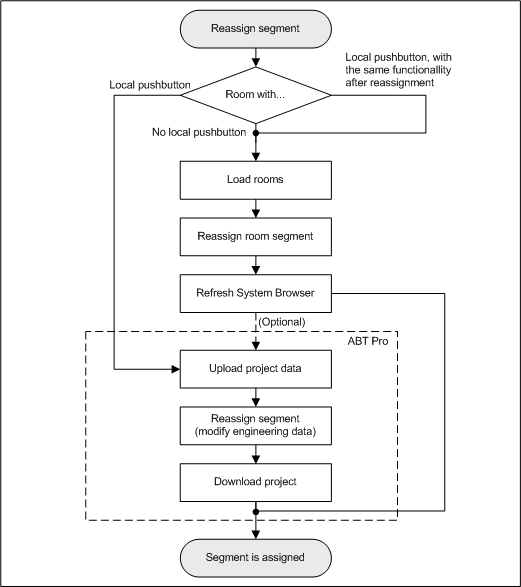
Room segment assignments can be changed using the flexible Room Editor. The corresponding objects must be created or preconfigured to make a new assignment. This section includes background information on assigning room segments. Information on procedures is available in the step-by-step section.

NOTE:
Group members can only be assigned within the same BACnet network and driver.
|
Room Editor | |
| Description |
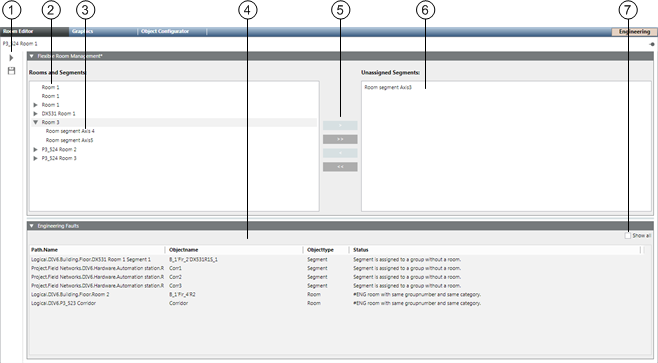
1 | Toolbar. |
2 | Rooms and segments Displays a list of available rooms. |
3 | Selected room The arrow indicates that a segment is assigned to a room. No segment is assigned to a room if no arrow is displayed. |
4 | Configuration Errors Displays a list of incorrectly created segments. |
5 | Assignment Buttons Assign/remove segment assignment. |
6 | Unassigned segments Displays a list of unassigned segments. |
7 | Show all Shows all segments with engineering errors. |
|
Room Editor Toolbar | ||
Symbol | Name | Description |
| Save | Saves the edited configuration in the system:
|
| Load/refresh current view | Loads the field data or updates the view of the room editor and its entries. The progress bar in the status bar shows the current state in case of load data. NOTE: Online connection must be available. |


