Lighting Command
Where You Can Find the Dialog Box
From the system tree, expand your BACnet device. From the Lighting Outputs folder, select an object. In the Property Name column, double-click lighting-command.
What You Can Do with the Dialog Box
The Lighting Command dialog box allows you to provide additional lighting functionality with special lighting-specific functions, such as ramping, stepping, and fading.
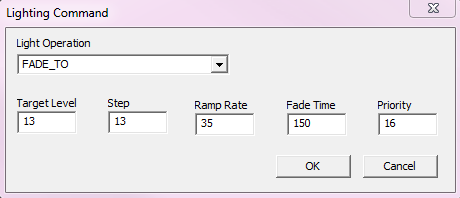
Field/Button | Description |
Light Operation | Defines the lighting operation desired. |
Target Level | Lighting level transitions to after being commanded. The normal range is 0.0% to 100.0%. |
Step | Size of the increments during transition. The range of allowable values is 0.1% to 100.0%. |
Ramp Rate | Represents the rate of change in percent per second. The ramp-rate value is 0. to 100.0. |
Fade Time | Represents the time in milliseconds over which the fade takes place. The range of allowable fade-time values is 100 ms to 86400000 ms (1 day). |
Priority | Allows you to enter one of the 16 BACnet priorities. |
OK | Confirms the modifications and exits the dialog box. |
Cancel | Cancels the modifications and exits the dialog box. |
