-
- Operating Step-by-Step
- Alarms
- Handling Events with Assisted Treatment
- Executing a Remote Notification Step in Assisted Treatment
Executing a Remote Notification Step in Assisted Treatment
- You are in the Assisted Treatment window and the operating procedure includes a remote notification step that you must execute manually.
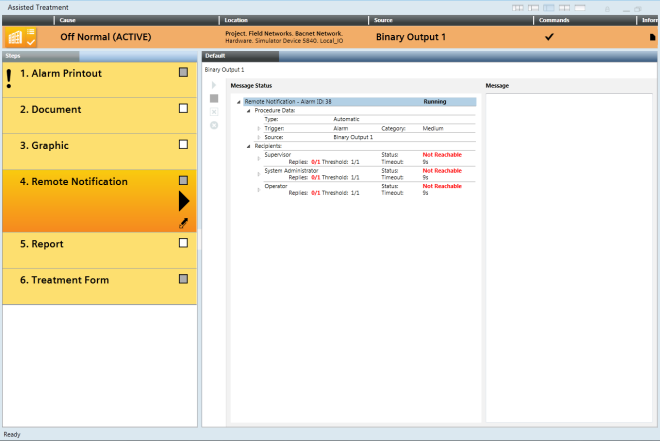 Reno Step
- From the Steps list, select the Remote Notification step.
- Depending on the type of remote notification, the following commands may become available in the Message Status toolbar:
- Start RENO procedure
 . Click to manually start the remote notification or to re-send the remote notification.
- Stop RENO procedure
 . Click to abort the remote notification.
- Stop RENO procedure escalation
 . Click to stop the escalation of the remote notification for the selected recipient group.
- (Optional) Select a recipient in the Message Status area to view the text of the message sent in the Message area.
- Wait for the system to finish sending the notification. Depending on the outcome, the steps status becomes one of the following:

Successful, and the remote notification message status is Completed. You can check off the step.

Failed, and the remote notification message status is Aborted, Partially failed or No Response. You can check off the step.
-
Failed, and the remote notification message status is Failed. You cannot check off the step.
