Configuring the Outgoing Email Service (SMTP Protocol)
Scenario: You want to configure the outgoing email connection.
Reference: For background information, see Email Service Expanders.
Workflow diagram:
Prerequisites:
- You obtained the outgoing mail server settings for the email account that Desigo CC will use.
- System Manager is in Engineering mode.
- System Browser is in Management View.
Steps:
1 – Configure the SMTP Protocol for the Email Service

- Select Project > Management System > Servers > Main Server > Mail.
- The RENO Configurator tab displays.
- Open the SMTP Protocol expander.
- Select the Enabled check box.
- Enter in the following fields the settings of the email account that you obtained previously, from the system administrator or service provider:
- Domain name
- SMTP host name (for example, smtp.example.com)
- Port (for example, 25 or 587)
- Security Type
- Sender name (for example, account@example.com)
- Password and Confirm password (If the SMTP server requires authentication, enter the password associated with the account.)
- Notes.
- Click Save
 .
.
2 – Test the Outgoing Email Connection

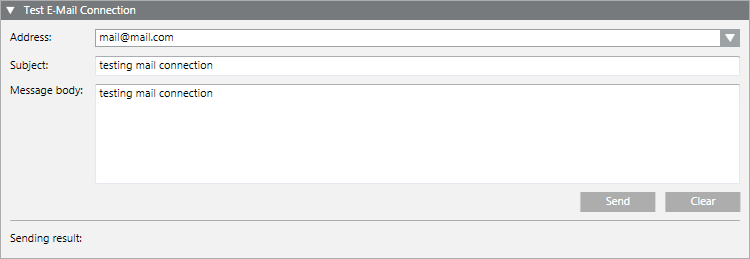
- Open the Test Email Connection expander.
- In the Address field, enter an email address or use the drop-down list to select a recipient from the address book.
- (Optional) In the Subject field, enter a subject for the message.
- In the Message body field, enter the text of the message.
- Click Send.
- This will send the test email message. The Sending result at the bottom of the expander shows the outcome and diagnostic information (for example,
OKorFailed: wrong SMTP server).
- Check that the email is received.
Information
NOTE:
This connection test only checks the outgoing (SMTP) email connection. The Desigo CC‘s diagnostics will automatically detect if there is a problem communicating with the incoming email servers (POP3 or IMAP4), or if one of those protocols is incorrectly configured, and generate an event to notify you of the fact.
Information
NOTE:
To troubleshoot the email service, see Communication Services Troubleshooting.
