Email Service Expanders
In Engineering mode, when you select the Mail object, the RENO Configurator tab displays. It contains the expanders to configure the incoming and outgoing email service, and an additional expander to test the email connection.
The SMTP Protocol expander lets you configure the settings of the mail server (SMTP) for outgoing messages.

Enabled
Option that enables the email service using the SMTP protocol.
Domain name
Intranet or Internet domain of the outgoing mail server.
SMTP host name
Name of the outgoing mail server (for example, smtp.example.com).
You can get this information from your network administrator or Internet Service Provider.
Port
Port used by the SMTP server (valid range of values: 1 through 65335).
Security Type
Security protocol when connecting to the SMTP server:
- None (unencrypted communication, clear text)
- SSL
- TLS
Sender name
Email address of the account.
NOTE: Desigo CC will use the email address of the sender as user name for the authentication on the SMTP server.
Password and Confirm password
Password associated with the account (if the SMTP server requires authentication). For security, the actual characters are represented by an asterisk (*).
Notes
Your remarks or comments.
For instructions, see 1 – Configure the SMTP Protocol for the Email Service.
The POP3 Protocol expander lets you configure the settings of the mail server (POP3) for incoming messages.

Enabled
Option that enables the email service using the POP3 protocol.
POP3 host name
Name of the incoming mail server (for example, pop.example.com).
You can get this information from your network administrator or Internet Service Provider.
Port
Port used by the POP3 server (valid range of values: 1 through 65335).
Security Type
Security protocol when connecting to the POP3 server:
- None (unencrypted communication, clear text)
- SSL
- TLS
Recipient
Email address of the account.
Password and Confirm password
Password associated with the email account (if the email server requires authentication). For security, the actual characters are represented by an asterisk (*).
Notes
Your remarks/comments.
For instructions, see Configuring the Incoming Email Service (POP3 or IMAP Protocol).
The IMAP Protocol expander lets you configure the settings of the mail server (IMAP) for incoming messages.

Enabled
Option that enables the email service using the IMAP protocol.
IMAP host name
Name of the incoming mail server (for example, imap.example.com).
You can get this information from your network administrator or Internet Service Provider.
Port
Port used by the IMAP server (valid range of values: 1 through 65335).
Security Type
Security protocol when connecting to the IMAP server:
- None (unencrypted communication, clear text)
- SSL
- TLS
Recipient
Email address of the account.
Password and Confirm password
Password associated with the email account (if the email server requires authentication). For security, the actual characters are represented by an asterisk (*).
Notes
Your remarks/comments.
For instructions, see Configuring the Incoming Email Service (POP3 or IMAP Protocol).
After you configure email, the Test E-Mail Connection lets you test the outgoing email connection (the incoming email connections are automatically and continuously checked by the system’s diagnostics).
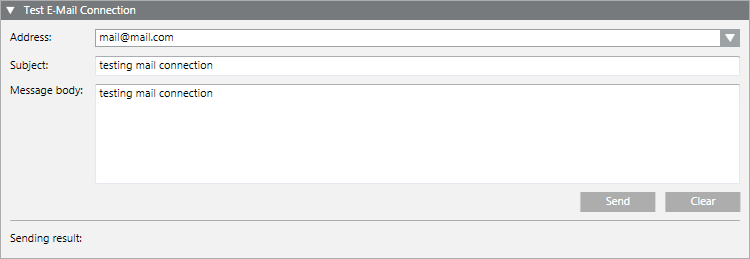
For instructions, see 2 – Test the Outgoing Email Connection.
