Alarming (Event Enrollment)
The fields that display in the Alarming section can vary depending on what you select in System Manager; a point that is referenced by one or more event enrollment objects, or an object that is an event enrollment object.
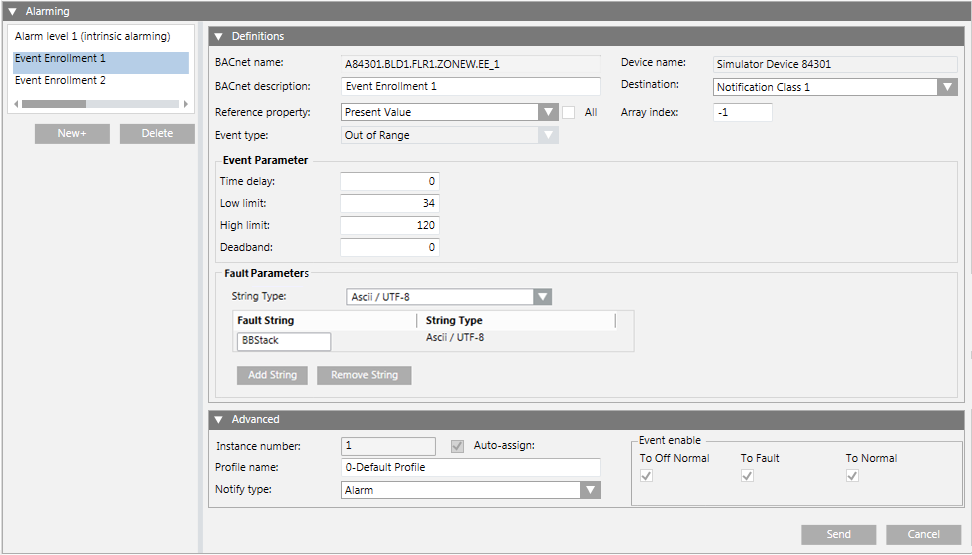
For points referenced by one or more event enrollment objects, the following fields are displayed when an event enrollment object is selected in the Alarming section:
|
Field/Button |
Description |
|
New |
Click this button to create an event enrollment object. The new object displays in the list with the default name EE_#_ monitored object ID where:
You can edit this name in the BACnet Name field of the Advanced section. |
|
Delete |
Deletes the selected event enrollment object. |
|
Definitions |
These fields calculate when an alarm should be issued. The fields default to the most common selections for the event enrollment object’s associated object. |
|
BACnet Name |
The BACnet name that is unique within the device. The Desigo CC object name displays in the System Browser, and is edited in the Object Configurator. |
|
BACnet Description |
The object’s BACnet description. |
|
Reference Property |
The property of the associated object which is applied to a standard algorithm (selected in the Event Type field) to determine if a change report (alarm) should be generated. |
|
Event Type |
The algorithm used with the property selected in Reference Property field. See Event Enrollment (Algorithmic Change Reporting) for more information. If desired, you can edit the Event Type regardless of whether the event enrollment object already exists at the device. |
|
Device Name |
The Desigo CC name of the device where the event enrollment object resides. |
|
Destination (Notification Class) |
Specify the destination (notification class) of the alarm from the drop-down field. |
|
Event Parameter |
Displays the parameters for the selected event type. When a BACnet object is required for the parameter, you can drag and drop the object from the System Browser to the BACnet Name field. |
|
Fault Parameters |
For any BACnet device that supports it, this allows an event enrollment object to generate a fault event, instead of OffNormal, based on specified parameters. |
|
Advanced |
|
|
Object Type |
The BACnet object type. |
|
Instance Number |
The number which uniquely identifies the object within the device. Check the Auto-Assign box when creating a new event enrollment object to have the system assign this number. |
|
Profile Name |
The object’s profile, which defines the set of properties, behavior, and/or requirements for a proprietary object, or for proprietary extensions to a standard object. |
|
Notify Type |
|
|
Event Enable |
Specify the types of alarm events:
|
|
Send |
Saves any changes you have made. |
|
Cancel |
Discards any changes you have made. |
When an event enrollment object is selected, the fields displayed are identical to the points referenced by one or more event enrollments, except for the following differences:
- The Main expander displays the event enrollment object’s information, not the information of the point that the event enrollment object is monitoring.
- The Definitions and Advanced expanders in the Alarming expander do not duplicate information already displayed in the Main expander.
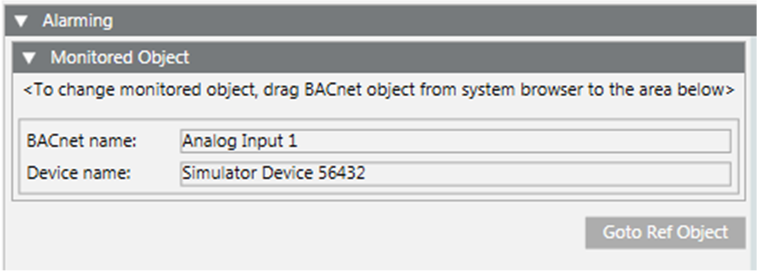
- The alarm list that normally displays on the left of Alarming expander is replaced by the Monitored Object expander.
|
Field/Button |
Description |
|
Monitored Object |
To change the monitored object, drag the BACnet object from the System Browser to this section. The BACnet name and Device name for the object displays in the list. If you drag a new object into this section, the monitored object reference is replaced, and the Event Parameter information in the Definitions expander is replaced with the default type for the new object. NOTE: You cannot drag an event enrollment object or multiple instances of the same object into this section. |
|
Goto Ref Object |
Use this button to navigate directly to the referenced point. |
