BACnet Editor Workspace
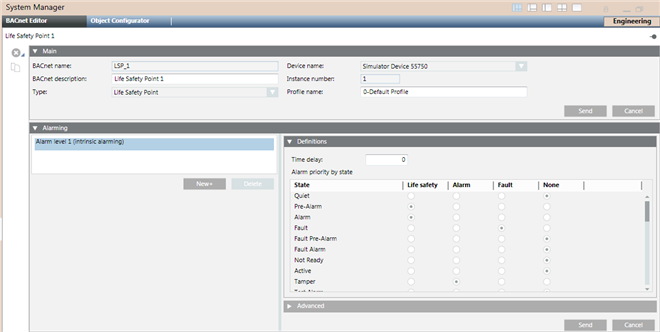
When selecting a BACnet object in the System Browser, the BACnet Object Editor displays the following sections in the Primary pane (the sections displayed will vary based on the selected object):
- Main (Object Properties): The object’s primary properties.
- Alarming (Intrinsic Alarming): If Alarm Level 1 (Intrinsic alarming) is selected, you can edit the object’s intrinsic alarming properties. Not all BACnet objects support intrinsic alarming.
- Alarming (Event Enrollment): Each object can have one or more event enrollment objects associated with it. However, each event enrollment object can only be associated with one BACnet object.
- Copy Alarms: Use this feature to copy the alarms from a selected (source) object to one or more target objects. This process creates new event enrollment objects for each target object, and overwrites the target object’s intrinsic alarm properties with the properties of the selected object.
- Recipient List (Notification Class): The properties for a Notification Class object. (This section is not shown in the screen above.)
- Life Safety Memberships: This view displays the memberships of the object selected in the System Browser.
- Structured View Subordinate List: This view provides a container to hold references to subordinate objects, which may include other Structured View objects.
- Trended Properties: Displays the properties that a Trend Log or Trend Log Multiple collects.
- Start/Stop (Trend Logs): Use this section to specify starting and ending dates for trend log collection.
- Property: By default, any additional BACnet properties not displayed in any other sections of the BACnet Object Editor displaying this section.
The following icons are available, depending on the type of object selected:
|
Application Toolbar. | ||
|
Icon |
Name |
Description |
|
|
Create New BACnet Object |
Select a device or an existing notification class object and click this button to create a new notification class object. Applies only to Notification Class objects. |
|
|
Save |
Saves any changes made to the notification class object. Applies only to Notification class objects. |
|
|
Save As |
Select an existing notification class object and click this button to create a new object. You will be prompted to complete the Name and Description fields for the new notification class object. Its fields will be populated with default values. Applies only to Notification class objects. |
|
|
Delete |
Delete the object selected in the System Browser. If an event enrollment object is selected, a message displays notifying you that deleting the event enrollment object also deletes its referenced BACnet object and other event enrollment objects associated with the referenced object.
|
|
|
Copy All |
Copy all the event enrollment objects and/or the intrinsic alarm associated with the selected BACnet object to one or more BACnet objects. This creates new event enrollment objects for each target object, and overwrites the intrinsic alarm properties of the target objects with the intrinsic alarm properties of the selected object. |


