SMS Service Expanders
In Engineering mode, when you select the SMS object, the RENO Configurator tab displays. It contains the provider expanders to configure the incoming and outgoing SMS service, and an additional expander to test the SMS connection.
The SMS GSM Provider expander lets you configure the settings of the GSM service provider for both incoming and outgoing SMS messages.
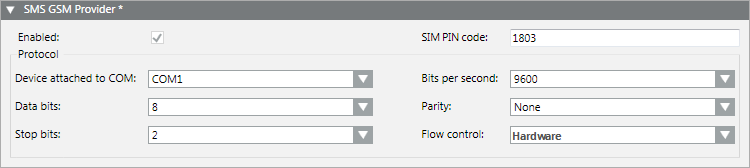
Enabled
This option enables the SMS service using the GSM provider.

NOTE:
When you enable the SMS GSM Provider, Desigo CC will always use the GSM modem to send/receive SMS messages (even if you also configured and enabled an email-to-SMS provider).
SIM PIN code
PIN code of the SIM card that is being used in the GSM modem. This field is limited to 8 digits.
Device attached to COM
COM port of the Desigo CC Server station to which the external GSM modem is connected (available settings: COM 1 through COM 10).
Bits per second
(Available settings: 300, 600, 1200, 2400, 4800, 9600, 19200, 38400, 56700, 115200, 230400, 460800, 921600)
Data bits
(Available settings: 5 through 8)
Parity
(Available settings: Even, Odd, None, Mark, Space)
Stop bits
(Available settings: 1, 1.5, 2)
Flow control
(Available settings: Hardware, Xon or Xoff, None). Default is Hardware.
For instructions, see 1 – Configure the GSM Provider for the SMS Service.
The SMS E-Mail Provider expander lets you configure the settings of an Email-to-SMS provider. Desigo CC sends remote notifications to this provider by email, and the provider in turn converts them into outgoing SMS messages.

Enabled
This option enables the SMS service using the Email-to-SMS provider.
Domain name
Domain name of the service provider (for example, smshosting.it). Desigo CC will send the remote notification by email to this domain. (Typically, the email is addressed To: <full phone number of recipient>@<provider domain>).
Subject prefix
Syntax used by the provider. This is typically a fixed string (for example, mittentesms or smssender) that the provider requires in the email subject line.
For instructions, see 1 – Configure the Email Provider for the SMS Service.
After you configure an SMS provider (GSM, or Email-to-SMS), the Test SMS Connection expander lets you test the SMS connection.
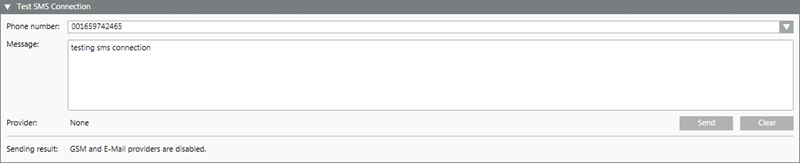
For instructions, see 2 – Test the SMS Connection (GSM Provider) and 2 – Test the SMS Connection (Email-to-SMS Provider).
