Communication Services
Desigo CC can be configured to communicate by email, SMS (text message), and/or pager. For related procedures, see the step-by-step section.
These communication services are used by the remote notifications and reports. The table below summarizes which services you need to configure to support different capabilities.
Capability | Communication Services to Configure |
Send reports by email | Outgoing email service (SMTP) |
Send remote notifications by email | Outgoing email service (SMTP) |
Receive responses to remote notifications by email | Incoming email service (POP or IMAP) |
Send SMS remote notifications, and receive responses, using the GSM modem | SMS service (GSM Provider) |
Send SMS remote notifications using an email-to-SMS provider | Outgoing email service (SMTP) SMS (Email-to-SMS provider) |
Send remote notifications to pagers | Pager service (TAP or ESPA) |
Communication services objects (Mail, Pager, and SMS) are located under
Project > Management System > Servers > Main Server in the Management View of System Browser.
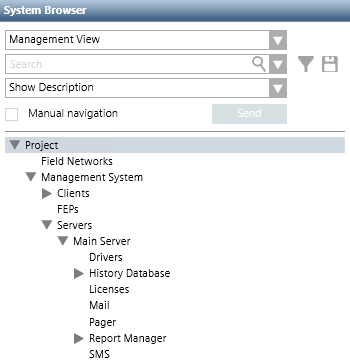
To enable Desigo CC to send remote notifications and receive responses by email, you must configure both incoming and outgoing email.
Outgoing email is also required if you want to be able to send reports by email, or to send SMS notifications through an Email-to-SMS provider service.

NOTE 1:
If no incoming email protocol (POP3 or IMAP) is enabled, the system will be unable to receive email responses from recipients of remote notifications. However, it may still be able to receive responses via other services that have been configured (for example, the system may send email with the SMTP protocol and receive replies to the GSM modem via SMS).
NOTE 2:
Make sure that all necessary email protocols (SMTP and POP3 or IMAP) are enabled (Enabled check box selected in the corresponding expander). If an email protocol configured but later disabled (Enabled check box cleared), the system will not alert you with any specific error message.
NOTE 3:
To reduce the risk of server downtime, it is recommended to use an intranet email server.
For details on the related workspace and configuration parameters, see Email Service Expanders.
To enable Desigo CC to send remote notifications and receive responses via SMS (text messages), you must configure the SMS service. You can configure one of the following:
- A GSM provider (incoming and outgoing SMS). In this case, messages are sent and received using a GSM modem (a device equipped with a SIM card that operates over a subscription to a mobile operator, like a mobile phone).
- An email-to-SMS provider (outgoing SMS only). In this case, no GSM modem is required. Desigo CC sends the messages by email to a service provider which then dispatches the message as an SMS.
NOTE 1:
Unlike the Email-to-SMS provider can only be used to send out SMS messages, but not to receive incoming SMS messages. If you configure and enable both, the system will use the GSM provider to send SMS messages.
NOTE 2:
If you want Desigo CC to send out SMS notifications, check that at least one SMS provider (GSM, or Email-to-SMS) is enabled (Enabled check box selected). If no SMS provider is enabled (Enabled check box cleared), the system will not alert you with any specific error message.
NOTE 3:
If both the GSM and Email-to-SMS providers are properly configured and enabled, the system will only try sending SMS notifications using the GSM modem. If this fails, it will not try the Email-to-SMS provider, but will instead try sending the notification to any recipients’ fallback device.
NOTE 4:
If the provider supports concatenated SMS messages, the ACK code is included in the first 160 characters (and not at the end of the message).
When you test the SMS connection, the Provider field shows which SMS provider will be used to send the test message.
- None: GSM and Email-to-SMS providers are both disabled.
- GSM: Only the GSM provider is enabled, or both the GSM and Email-to-SMS providers are enabled.
- E-Mail: Only the Email-to-SMS provider is enabled.
Characters Not Supported by Protocol GSM 03.38
Some special characters are not supported by GSM 7-bit basic character set of protocol GSM 03.38. See the following table for reference.
Unsupported Character | Transformed into |
€ | E |
^ | Λ |
{ | ( |
} | ) |
[ | ( |
] | ) |
@ | Ø |
| | ! |
~ | - |
\ | / |
Ξ | X |
ç | Ç |
° | ¤ |
For details on the related workspace and configuration parameters, see SMS Service Expanders.
To enable Desigo CC to send remote notifications to recipients’ pagers, you must configure the pager service. Depending on what paging equipment is installed on the Desigo CC server, you must configure one of the following:
- Telelocator Alphanumeric Protocol (TAP)
- European Selective Pager Association protocol (ESPA 4.4.4)
NOTE 1:
If you want Desigo CC to send remote notifications to pagers, make sure the appropriate pager protocol (TAP or ESPA 4.4.4) is enabled. If a pager protocol is correctly configured but later disabled (Enabled check box cleared), the management stations will not alert you of the fact with any specific alarm or error message.
NOTE 2:
Generally, paging equipment (transmitter and receiver) that use ESPA 4.4.4 are compliant with ISO/IEC 646 character set. However, national variants or proprietary standards for international use may affect the conversion of some special characters.
ESPA Settings (Poll Timer)
| ESPA Poll Timer Settings (msec) | |||
Deployment Scenario | Pager Connection | Min | Max | Recommended |
Desigo CC installed on a virtual machine | Serial port | 100 | No limits | 100 |
Desigo CC installed on an physical machine | Serial port | 100 | No limits | 100 |
Desigo CC installed on a virtual machine | Remote serial port | 5000 | No limits | 40000 |
Desigo CC installed on a physical machine | Remote serial port | 5000 | No limits | 40000 |
Desigo CC installed on a virtual machine in a distributed environment | Serial port | 100 | No limits | 100 |
Desigo CC installed on an physical machine in a distributed environment | Serial port | 100 | No limits | 100 |
Desigo CC installed on a virtual machine in a distributed environment | Remote serial port | 5000 | No limits | 40000 |
Desigo CC installed on a physical machine in a distributed environment | Remote serial port | 5000 | No limits | 40000 |
Many Desigo CC installations concurrently share the ESPA pager | Remote serial port | 5000 | No limits | 40000 |
- Due to performance limitations:
- In case of an individual Desigo CC installation that uses the ESPA pager, it is suggested to set the poll timer to the recommended value (see the reference table above).
- In case many Desigo CC installations share the ESPA pager, it is suggested to set the poll timer to a value higher than the recommended value. This means that the higher is number of installations, the higher the poll timer value must be.
- To customize the poll timer valid range, contact a Desigo CC librarian.
For details on the related workspace and configuration parameters, see the Pager Service Expanders section.
