Pager Service Expanders
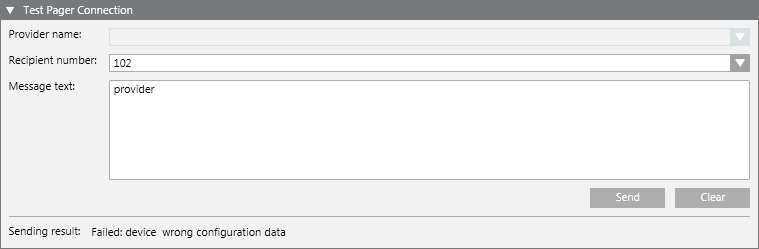
In Engineering mode, when you select the Pager object, the RENO Configurator tab displays. It contains the protocol expanders to configure the paging service, and an additional expander to test the pager connection.
The TAP Protocol expander lets you configure the settings of the paging service using TAP protocol. You must configure both the protocol settings and the providers for dispatching the pager messages.
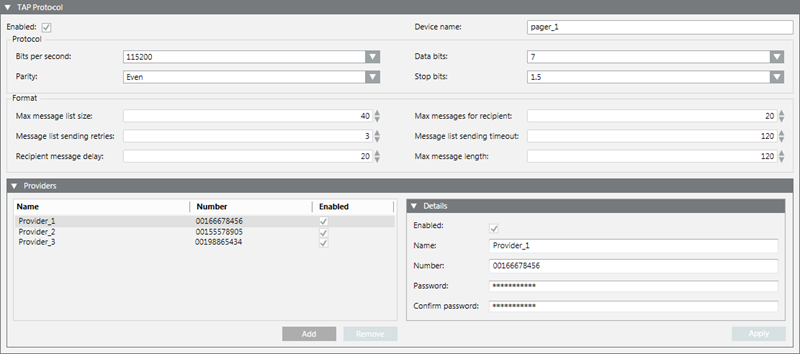
Enabled (TAP Protocol expander)
This option enables the paging service using the TAP protocol. If selected, the ESPA protocol is automatically disabled.
Device name
Name of the provider of the paging service.
This value must be unique, and the field is limited to 50 characters.
Bits per second
(Available settings: 300, 600, 1200, 2400, 4800, 9600, 19200, 38400, 56700, 115200, 230400, 460800, 921600). Default is 115200.
Parity
(Available settings: Even, Odd, None, Mark, Space). Default is Even.
Data bits
(Available settings: 5, 6, 7, 8). Default is 7.
Stop bits
(Available settings: 1, 1.5, 2). Default is 1.5.
Max message list size
Maximum size for the message list. Valid range is 1 through 80. Default is 40.
Message list sending retries
Number of dispatching retries. Valid range is 1 through 99. Default is 3.
Recipient message delay
Minimum waiting time in seconds before dispatching new messages to a recipient, once the max number of messages for a recipient has been reached. Valid range is 20 through 300. Default is 20.
Max messages for recipient
Maximum number of messages for a recipient in a message list. Valid range is 1 through 50. Default is 20.
Message list sending timeout
Maximum time interval for the message list delivery in seconds. Valid range is 10 through 1000. Default is 120.
Max message length
Maximum length for the message. Default is 120.
Enabled (Providers expander)
This option enables a provider for the TAP protocol.
Name
Name of the service provider.
This value has to be unique. The field is limited to 50 characters. Comma is not allowed.
When you remove a provider, you are notified in case it is already in use by a recipient and the operation is aborted.
Number
Phone number of the service provider from which the messages will be sent.
Valid range is 0 through 9 and plus (+). This field is limited to 50 digits. Comma not allowed.
Password and Confirm password
Password associated with the paging service (if the provider requires authentication). For security, the actual characters are represented by an asterisk (*).
For instructions, see Configuring the Pager Service (TAP Protocol).
The ESPA Protocol expander lets you configure the settings of the paging service using ESPA 4.4.4 protocol.
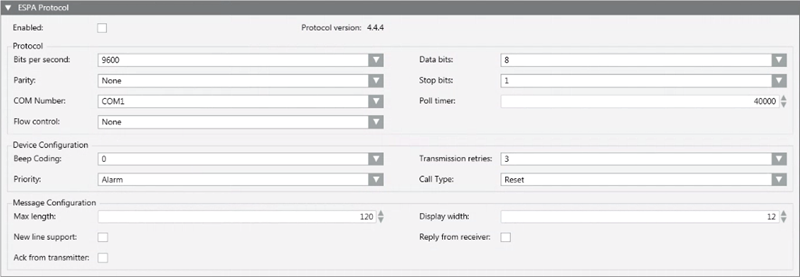
Enabled
This option enables the paging service using the ESPA protocol. If selected, the TAP protocol is automatically disabled.
Bits per second
(Available settings: 300, 600, 1200, 2400, 4800, 9600, 19200, 38400). Default is 9600.
Data bits
(Available settings: 5, 6, 7, 8). Default is 8.
Parity
(Available settings: Even, Odd, None, Mark, Space). Default is None.
Stop bits
(Available settings: 1, 1.5, 2). Default is 1.
COM Number
Default is COM1.
Poll Timer
Valid range: 10-60000 milliseconds. Default is 60000 milliseconds.
For more details about this setting, see ESPA Settings (Poll Timer).
Flow control
(Available settings: Xon or Xoff, Hardware, Hardware and Xon or Xoff, None). Default is None.
Beep Coding
(Available settings: 0, 1, 2, 3, 4, 5, 6, 7, 8, 9). Default is 1.
Priority
(Available settings: Alarm or High). Default is Alarm.
Transmission retries
(Available settings: 1, 2, 3, 4, 5, 6, 7, 8, 9). Default is 3.
Call Type
(Available settings: Standard, Reset (to cancel previous messages), Speech (to generate a voice message)). Default is Standard.
Max length
Maximum length for the message. Default is 120 characters. Maximum of characters: 128.
New line support
This option enables the new line support. Default is deselected.
Ack from transmitter
This option allows expecting an acknowledgement from the paging equipment connected to the Desigo CC server.
Display width
Number of characters per line. Default is 12 characters. Maximum of characters: 99.
Reply from receiver
This option allows expecting a reply message from the recipient’s pager (if the equipment supports this feature).
For instructions, see Configuring the Pager Service (ESPA Protocol).
After you configure the pager protocol, the Test Pager Connection expander lets you test the paging connection.